I made this skill after building this site, so other people could use it. It is a quick way to launch a site that follows just about every best practice, and it walks you through the whole thing from start to finish. There is some copying and pasting into a terminal, and you will have to save a few secret tokens along the way. If you have never vibe coded before, this is a good first try.
Download the skill (12 KB, zip)
A skill is a set of instructions you drop into a folder on your machine. Claude Code reads it when the work matches, and follows it instead of improvising. This one covers a full site launch: project setup, hosting, a database-backed editor, search and AI-search readiness, moving a live domain without breaking email, and a verification routine for every deploy.
The part worth reading first
The stack is not the interesting bit. Plenty of guides tell you to use Astro on Cloudflare. What that advice leaves out is the two days of failures between a working local build and a site that behaves correctly on a real domain.
This skill encodes those failures as a lookup table. Every row cost real time to find.
| What you see | What is wrong |
|---|---|
| Deploy fails with a permission error on the build folder | A local preview server still holds a lock on it. Stop it, then kill leftover worker processes. |
| The adapter refuses your config | You set main in wrangler.toml. Remove it. The adapter writes its own config during the build. |
| Database calls fail during the build | A pre-rendered page is querying the database at build time. Mark that route as server-rendered. |
| Search Console reports your redirects as soft 404s | Astro's built-in redirect config emits meta-refresh stubs, not real redirects. Serve 301s from a catch-all route. |
| Unknown URLs skip your redirect logic entirely | Middleware only runs for routes that matched. Unknown paths need their own catch-all page. |
| Your database and storage are undefined at runtime | Recent Astro removed the old runtime environment object. Import the bindings from the Cloudflare module instead. |
| The live site looks unchanged after a deploy | Edge cache. Re-request with a cache-busting query string before you start debugging code. |
| The domain still loads the old host on your machine | Your local DNS cache, not the site. Verify by pointing curl straight at the Cloudflare address. |
| Google reports duplicate URLs | Trailing slash mismatch. The served URL, the canonical tag, the sitemap, and your internal links must all agree on one form. |
If you take nothing else, take that table.
What you need before you start
- Node 20 or newer, plus npm and git.
- A Cloudflare account. The free plan covers everything here.
- A domain you control, or one you are ready to buy.
- Claude Code installed.
- A brand system, or the willingness to build one. More on that below, because the skill refuses to proceed without it.
Step 1. Install the skill
Download the zip, then unpack it into your personal skills folder.
On macOS or Linux:
unzip ~/Downloads/astro-cloudflare-site-skill.zip -d ~/.claude/skills/
On Windows, in PowerShell:
Expand-Archive -Path "$env:USERPROFILE\Downloads\astro-cloudflare-site-skill.zip" -DestinationPath "$env:USERPROFILE\.claude\skills"
You should end up with a folder called astro-cloudflare-site containing SKILL.md and a references folder. Restart Claude Code so it picks up the new skill.
Step 2. Start the build
Open Claude Code in an empty folder and describe what you want in your own words. Something like: build and launch a site for my domain on Astro and Cloudflare. The skill description matches that kind of request, so it loads on its own.
It will start by asking you six questions: the domain and who it is registered with, what the site is for, whether you have a brand system, what content exists today, whether you will edit copy yourself after launch, and anything that must never appear on the site. Those answers get written to a brief in the repo, and you approve the brief before any code gets written.
Step 3. Expect to be stopped at the brand gate
People are surprised by the brand gate, and it is deliberate.
The skill will not pick colors and fonts for you. If you do not have a documented brand system, it stops and tells you to get one, because a site built before the brand is a site you build twice. It then offers three ways forward: hire a designer and come back, run a short guided session that produces a working system to build against, or ship a deliberately neutral placeholder with every color and font behind a variable so a real brand can be dropped in later without touching a single page.
The reference file for that session asks about positioning, existing colors in the business, light or dark, one typeface or two, and which words must never appear. It also lists the visual defaults that make a site look machine-made, so you can avoid them on purpose rather than by accident.
How the whole thing works, in plain words
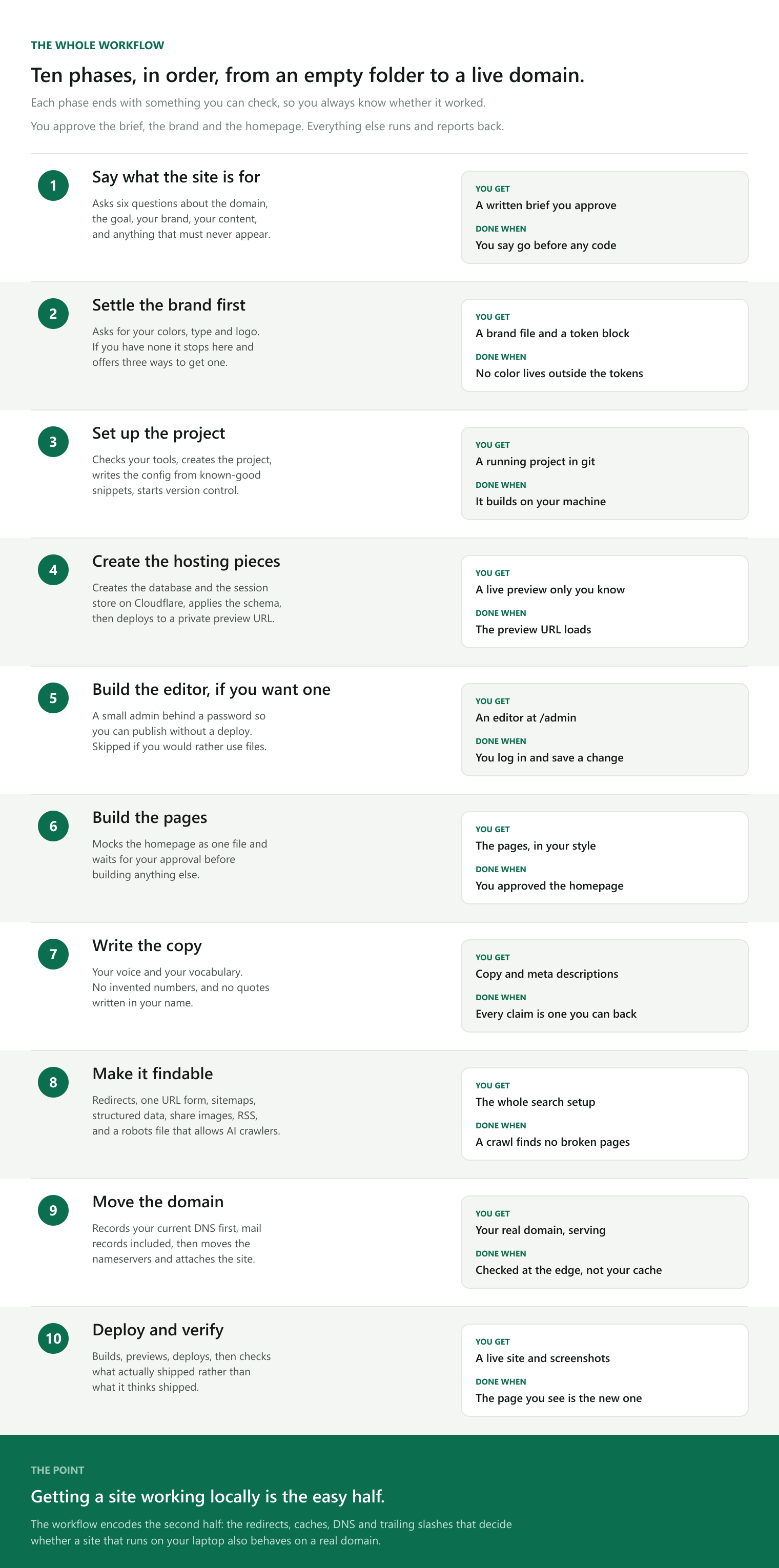
The poster above is the map. Each phase below says what it does and why it sits where it does.
The pieces you end up with
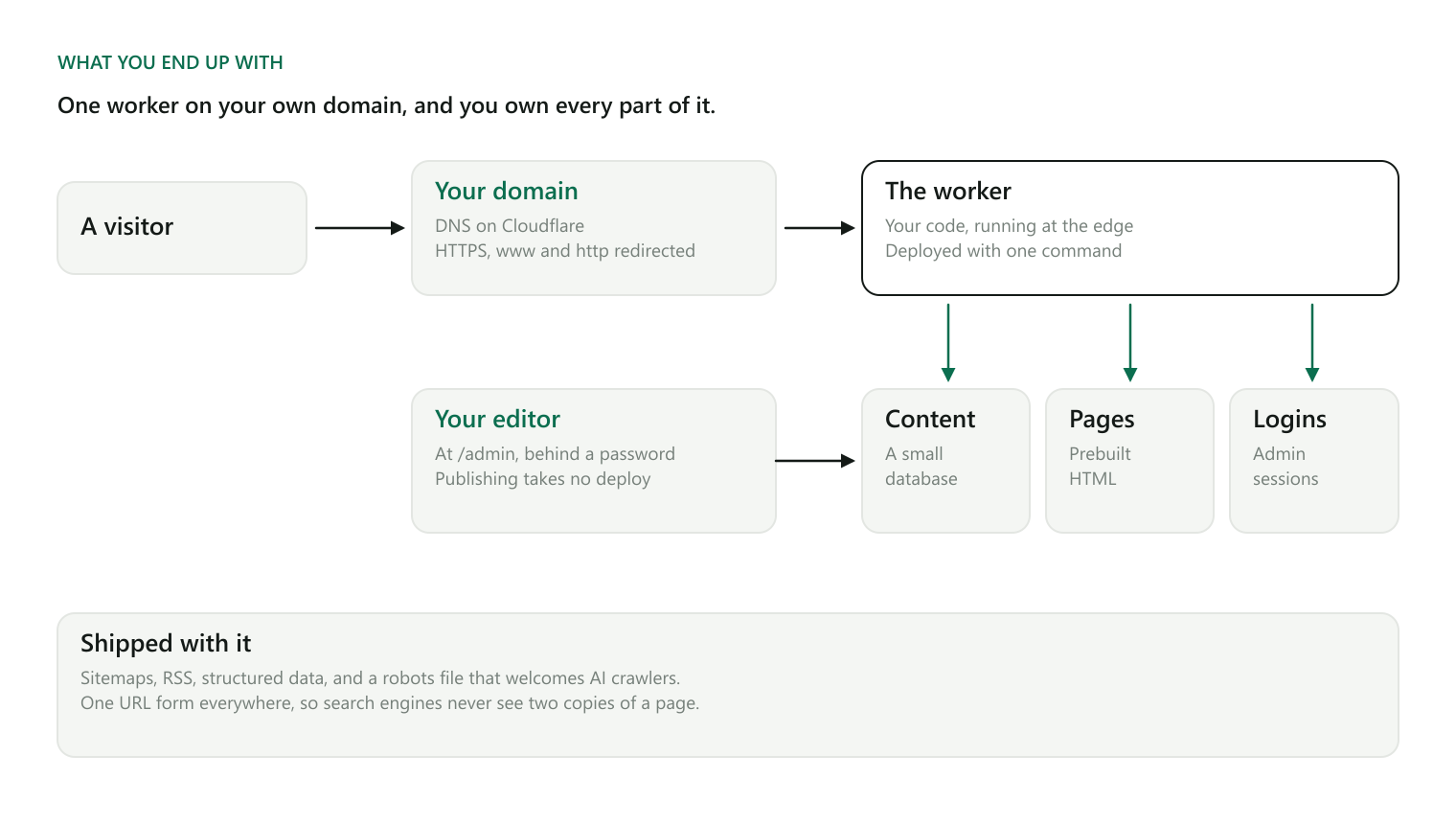
Before the phases, it helps to know what a finished site is made of here. There are only four things.
A domain, which is the address people type. Its settings live at Cloudflare, which is the company routing the traffic.
A worker, which is your site's code running on Cloudflare's machines around the world. Not one server in one city. The same code runs near whoever is visiting, which is why pages arrive quickly.
A small database, which holds anything you want to change without republishing the site: your posts, your redirects, your subscriber list.
Prebuilt pages, which are the parts that never change per visitor. These are assembled once when you deploy, so serving them costs almost nothing.
Phases 1 and 2: decide before you build
The first two phases produce no code at all, which is the point. Phase one writes down what the site is for and what a visitor has to be able to do. Phase two settles the brand.
Both exist because the expensive mistakes are decisions, not typos. Changing your mind about the audience after twenty pages exist means rewriting twenty pages.
Phases 3 and 4: the plumbing
Phase three creates the project and writes the configuration files. These are copied from a reference sheet of settings already known to work together, rather than assembled from memory, because most of the failures in that table earlier are configuration mistakes.
Phase four creates the two storage pieces at Cloudflare and pushes a first version to a private preview address. You get something real to look at within the first hour, which matters more than it sounds. It proves the whole chain works before any design exists to argue about.
Phase 5: the editor, if you want one
If you plan to write your own posts, the skill builds a small editor at a private address, behind a password. Publishing then takes seconds and no technical steps.
The security here is specified rather than left to chance, because a login page you build yourself is a login page you can get wrong. Passwords are hashed with a deliberately slow method so a stolen database is not a stolen password list. Sessions live on the server rather than in a cookie a visitor could edit. Every write checks it came from your own site. Repeated wrong passwords get throttled. Anything you type into the editor is escaped before it is displayed, so a stray piece of code in a post cannot run.
If you would rather keep your content in files, say so and this phase is skipped.
Phases 6 and 7: the pages and the words
Phase six builds one page, the homepage, as a single file, and stops. You look at it and say yes or no. People react to a picture and stall on a paragraph, so this is much cheaper than describing a layout and hoping.
Phase seven writes the copy in your voice, with two hard rules: no invented statistics, and no quotes written in your name. If a number appears on the page, it is real and you can point at where it came from.
Phase 8: being found
Most people skip this phase and pay for it later.
One address per page. A page reachable at two slightly different addresses looks like two pages to a search engine, and the credit for it gets split. The skill picks one form and makes the served page, the canonical tag, the sitemap, and every internal link agree.
A sitemap, which is a list of your pages handed to search engines so they do not have to guess.
Structured data, which is a short machine-readable description attached to each page saying what kind of thing it is: a person, an article, a set of steps. Without it a search result is only a blue link.
A robots file that explicitly welcomes the crawlers behind AI assistants, so your pages can be cited when someone asks an assistant a question in your area. Some hosts block those by default, so the skill turns that off.
Share images, generated by a script so the picture that appears when someone posts your link stays in sync with the page.
Phase 9: moving the domain without breaking email
The risky one, handled carefully.
Your domain settings do two unrelated jobs: they point at your website, and they point at your email. Move them carelessly and you keep your site while quietly losing your mail.
The skill records everything first, mail records included, before changing anything. Then the nameservers move, then the site is attached to the domain.
The last part matters: it checks the result by asking Cloudflare directly rather than trusting your own computer, because your machine remembers the old address for hours and will show you the old site long after the move worked.
Phase 10: verify what shipped, not what you think shipped
Every deploy ends with a check that the page now being served is the new one. Caching makes a successful deploy look like a failed one often enough that guessing is not good enough.
What it will not do
It will not invent a visual identity. It will not write numbers it cannot source. It will not transfer your domain registration, since connecting the domain is reversible and transferring is slower to undo. It does not assume you want a content system, and it skips that phase if you would rather keep content in the repo.
It also carries no defaults from the sites it came from. No palette, no fonts, no voice rules, no file paths. That was the point of extracting it.
Honest limits
This is a working playbook pulled out of two real builds, not a product. It was verified against Astro 6 and version 13 of the Cloudflare adapter. Those move, so check the adapter changelog if you are reading this much later. The config snippets are the most likely thing to age.
If you use it and something in the troubleshooting table is wrong, or you hit a failure that deserves a tenth row, tell me.
TLDR
- A Claude Code skill that takes you from an empty folder to a live site on your own domain, using Astro and Cloudflare.
- Ten phases. You approve three things: the brief, the brand, and the homepage. The rest runs and reports back.
- It stops and refuses to continue if you have no brand system, because building first means building twice.
- The real value is the troubleshooting table. Nine failures that sit between a working local build and a correct live site.
- Free to run on Cloudflare's free plan. You need Node 20 or newer, a domain, and Claude Code.
- Verified against Astro 6 and Cloudflare adapter 13. Check the changelog if you are reading this much later.
Copy for your AI
Paste this into ChatGPT, Claude, Gemini, or Grok to get help running it, or to decide whether it fits your situation before you download anything.
I am considering a Claude Code skill called "astro-cloudflare-site" that launches a website end to end. Here is what it does. Help me decide whether it fits my situation, and if it does, walk me through it one phase at a time.

The stack: Astro (a website framework) deployed to Cloudflare Workers (code that runs on servers around the world rather than in one place), with a small D1 database (Cloudflare's SQL database) for anything editable, and KV storage for admin logins. The free Cloudflare plan covers it.

The ten phases, in order:
1. Intake. Six questions: domain, purpose, brand, existing content, whether the owner will edit copy later, and any hard rules. Produces a written brief the owner approves before any code.
2. Brand gate. It asks for documented colors, type and logo. If there is no brand system it stops and offers three routes: hire a designer, run a guided session, or use a neutral placeholder with everything behind CSS variables. All colors and fonts live in one token block.
3. Project setup. Creates the Astro project, installs the Cloudflare adapter and Tailwind, writes config from a reference sheet of known-good settings, starts git.
4. Cloudflare resources. Creates the D1 database and KV namespace, applies the schema locally and remotely, deploys to a workers.dev preview URL.
5. Optional CMS. A small admin behind a password: PBKDF2 hashing, server-side sessions, fail-closed origin checks on writes, login throttling, escaping in structured data and rendered markdown, a redirect editor that rejects loops. Skipped if the owner keeps content in files.
6. Pages. Mocks the homepage as one standalone file and waits for approval before building the rest.
7. Copy. Owner's voice. No fabricated statistics, no quotes written in the owner's name, meta descriptions 140 to 158 characters.
8. SEO and AI search. Canonical redirects, one URL form site-wide, sitemaps excluding admin routes, robots.txt allowing GPTBot / ClaudeBot / Google-Extended, llms.txt, JSON-LD per page type, generated Open Graph images, RSS.
9. Domain go-live. Records existing DNS including MX and TXT first so email survives, then moves nameservers, attaches routes, and verifies against the Cloudflare edge rather than the local DNS cache.
10. Verification on every deploy. Build, preview locally, stop the preview before deploying because it locks the build folder, deploy, then confirm what shipped with a cache-busting request.

Nine known failure modes it already handles: build-folder lock from a running preview; setting "main" in wrangler.toml which the adapter rejects; database calls during prerender; Astro's static redirects emitting soft 404s; middleware not running for unmatched URLs; bindings undefined because Astro removed Astro.locals.runtime.env; edge cache hiding a deploy; local DNS cache showing the old host; trailing-slash mismatch causing duplicate URLs.

Requirements: Node 20+, npm, git, a Cloudflare account, a domain, Claude Code. Verified against Astro 6 and @astrojs/cloudflare 13.

My situation: [describe your domain, whether you have a brand system, whether you want to edit copy yourself, and how technical you are].