This one saves me real time. I check my email in Claude now. It reads the whole inbox, keeps only the threads actually waiting on me, labels and archives the rest, and never deletes anything. The open problem I am still working on is running it across several Gmail accounts at once. If you have solved that, tell me.
Download the setup prompt (8 KB)
Why this is a prompt and not a skill
I published this as a downloadable skill first, and that was the wrong shape.
A skill is a fixed set of instructions. But almost everything that makes inbox triage useful is specific to you: what counts as needing a reply, which senders you always handle yourself, what your labels are called, which of your colleagues writes from two addresses. Shipping my version of those answers means shipping my inbox habits to you, and asking you to edit a file to fix it. Then the next download overwrites your edits.
This is a setup prompt instead. You paste it into Claude once. It interviews you, then writes a skill personalized to your inbox and schedules it to run. What you end up with is your own file, with your answers baked in, that nothing else overwrites.
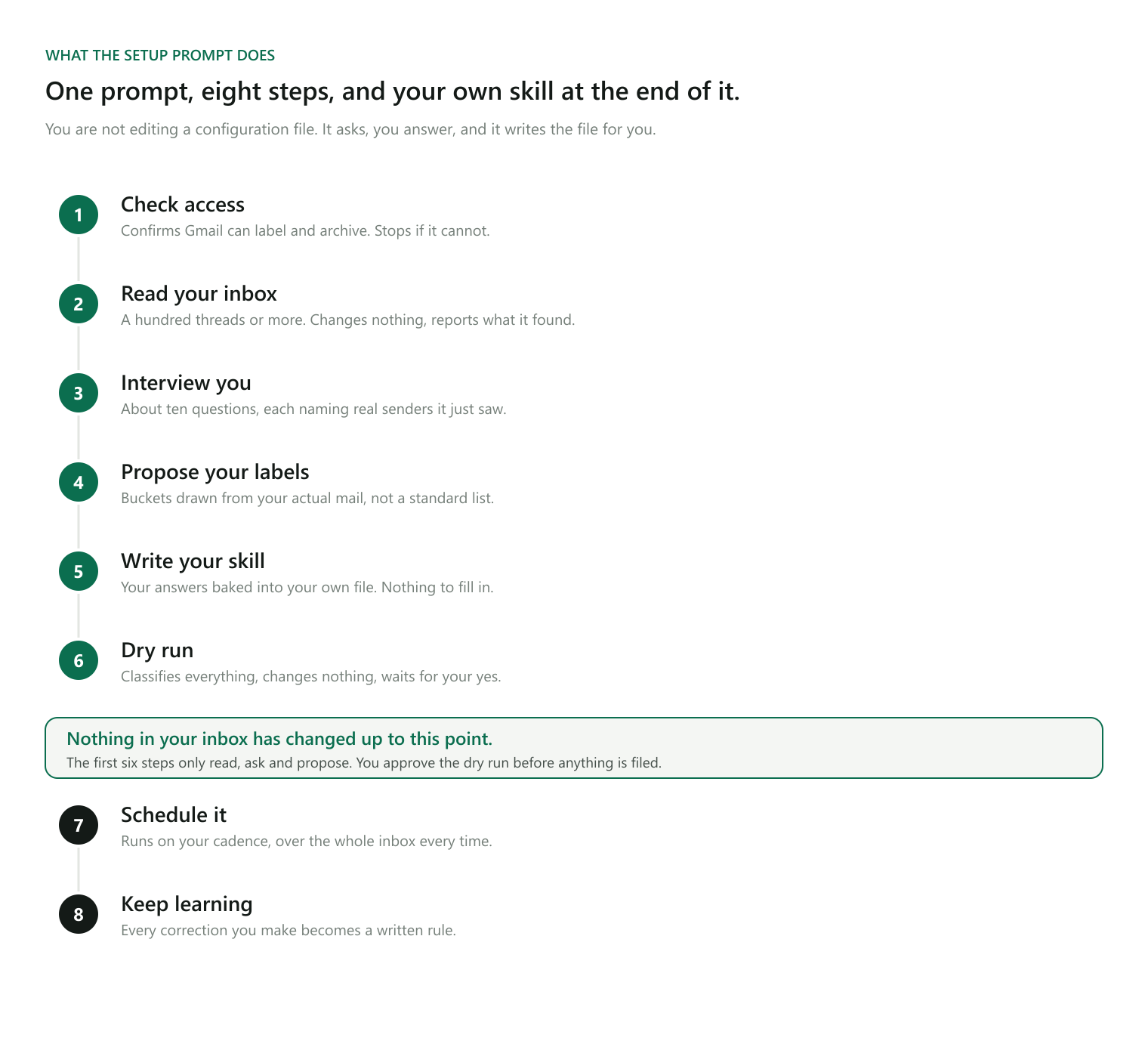
The one thing that does not change is the rule underneath.
The single rule
Your inbox should contain only threads where someone is waiting on a reply or an action from you.
Everything else gets a topic label for later reference, gets marked read, and gets archived. Archiving removes the inbox label and nothing else, so every message stays searchable and every run is reversible.
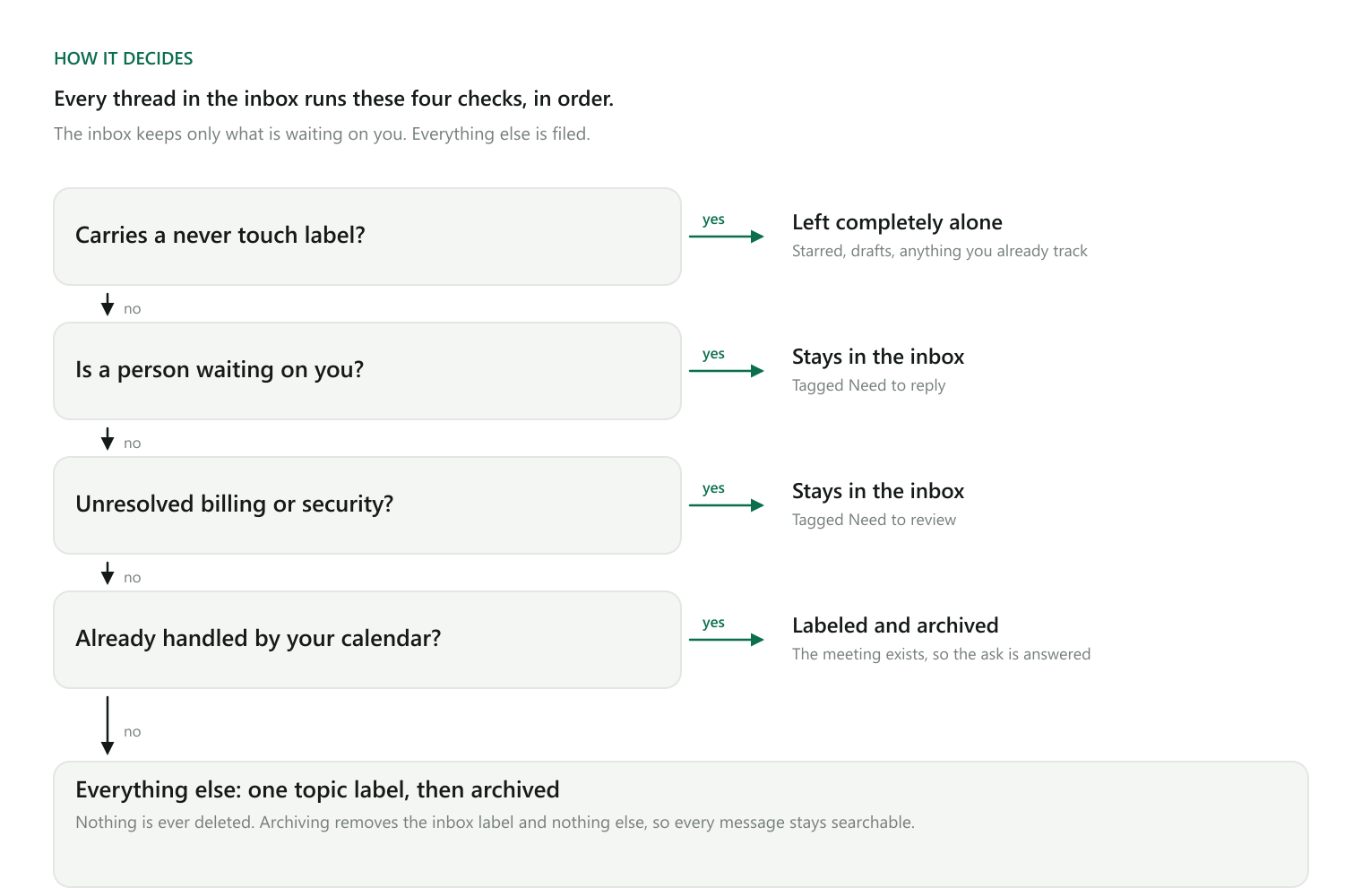
The order of those checks is fixed. What counts as a person waiting on you, which threads are never touched, and what the buckets are called all come from your answers during setup.
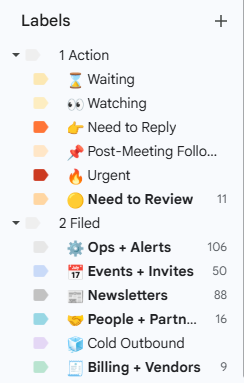
Mine ended up like this. The top group stays in the inbox and the routine never touches most of it. The bottom group is where everything else gets filed, and the counts are what it has put there so far.
What you need
- A Gmail connection with modify access, meaning it can add labels and archive. Read-only is not enough, and the setup stops and tells you rather than retrying in a loop.
- A Google Calendar connection with read access. Optional, but it is where a lot of the value comes from.
- Nothing else. You do not need to create labels first. Working out which ones you need is part of the setup.
Step 1. Paste the prompt
Download it, or copy it from the block at the end of this page, and paste the whole thing into Claude. It will not touch your mail yet.
Step 2. It reads your inbox before asking you anything
It reads a broad sample, at least a hundred threads, and reports back what is in there: who writes to you most, what is automated versus a real person, what you already label or star, and roughly how much of your mail is newsletters, alerts, invoices, and scheduling.
This exists so the questions in the next step are about your actual mail rather than a hypothetical inbox.
Step 3. It interviews you
About ten questions, asked a few at a time, most referencing real senders it saw. The ones that carry the most weight:
What you do, and who writes to you. Without it, a customer escalation and a vendor newsletter look the same.
Which addresses are yours. Plenty of people use two. Without this, the same person from a second domain looks like a stranger.
Who is on your team. So their messages read as internal rather than as an outside request.
What you most do not want to miss. The single most useful answer. It defines what stays in your inbox.
What is in your inbox right now that should not be. It points at real examples and you react to those.
What you always handle by hand. Senders, topics, or labels it must never touch. Your escape hatch, honored without exception.
How you already use labels and stars. If you have a system that works, it builds on that instead of replacing it.
How cautious it should be. Two settings: keep anything uncertain, or file anything that is not clearly a request. It recommends the cautious one to start.
If you do not know an answer, it picks a sensible default, tells you why, and flags it to revisit in a week.
Step 4. It writes your skill
It proposes your labels and buckets, derived from what is in your inbox rather than a standard list, and waits for your yes. Then it creates any missing labels in Gmail, looks up their real IDs rather than guessing, and writes a skill file into your own skills folder with every answer baked in.
That file is yours. It reads as instructions about your inbox, not as a template with blanks. Nothing you download later overwrites it.
Step 5. You approve a dry run
It then classifies your entire inbox and changes nothing.
You get a short table: what it would keep and why, counts per bucket for what it would file, and a separate list of anything it was unsure about. You correct whatever is wrong, and each correction gets written into your skill before anything runs for real.
Nothing is archived until you approve this.
Step 6. It schedules itself
It asks how often and when, then sets up a recurring task. Daily in the morning is a good default. If it cannot schedule tasks in your setup, it says so plainly and gives you the exact steps to do it yourself.
One detail that matters: whatever runs it searches the whole inbox every time rather than a time window. If a run fails or you skip a few days, the next run picks up everything that was missed instead of quietly stranding it.
What the routine run does
A real person asking you something stays. An unresolved problem with something you run stays. A one-time verification code does not, since it has expired by the time you read it. A notice saying a problem was already fixed does not either. When it cannot decide, your caution setting decides for it.
Then the calendar cross-check, which is the part I did not expect to like as much as I do. If someone asked to find time and a meeting now exists with their address on it, the ask is already satisfied, so the thread gets filed instead of sitting in your inbox as a fake to-do. Invites for events that already happened, or that you already accepted or declined, get filed too.
It works the other direction as well. If a proposed time collides with something already on your calendar, the thread stays and both get named. If an invite went to a different person than the one who asked, that stays too, though it checks your alias list first so a colleague's second address does not trigger a false alarm. It only raises an unanswered invitation when your attendance matters, meaning you organized it, you are the only person from your side, or someone outside is expecting you specifically.
Calendar access is read-only. It never creates, edits, or answers an event for you.
It keeps learning
Your skill is not finished after setup. When you pull something back into your inbox, or say a kept thread did not need keeping, that becomes a written rule in your own words. Buckets that collect two unrelated kinds of mail get split. Buckets that stay empty for weeks get removed.
The safety rules
These are stated as absolutes, and they are the reason I am comfortable running it unattended.
- It never deletes or trashes anything. Labels and archiving only.
- It never sends an email.
- It never writes or edits a draft, even when a reply is needed. It describes the reply in the report and leaves the writing to you.
- It never creates, changes, or answers a calendar event.
- It never triages an inbox it has not profiled and had a dry run approved for.
What you get back
A short report. How many were archived, how many kept, and for each one kept, who sent it, what it is about, and why it stayed. Anything the calendar turned up. Anything it was unsure about. Security and payment problems are called out by name rather than folded into a count.
It only interrupts you when something needs you now, and only for the kinds of thing you named during setup.
Worth knowing before you trust it
Expect to adjust the buckets for the first week or two, then leave them alone. Most inboxes settle into six to ten stable categories.
The aliases and teammates answers are what make it accurate. Take those two seriously before letting it run on a schedule.
And the thing I have not solved: running it across several Gmail accounts in one pass. Right now it profiles one person and one inbox. If you have a good approach, I would like to hear it.
TLDR
- Paste one prompt into Claude. It interviews you, writes a triage skill personalized to your inbox, and schedules it to run.
- You do not edit any configuration. Your answers are baked into your own file, which nothing later overwrites.
- The fixed rule: your inbox holds only threads waiting on a reply or an action from you. Everything else is labeled and archived.
- Nothing is ever deleted. Archiving only removes the inbox label, so every run is reversible.
- It reads your calendar too, so a request that already became a meeting stops sitting in your inbox as a fake to-do.
- Nothing moves until you approve a full dry run, and every correction you make afterwards becomes a rule it keeps.
Copy for your AI
The block below is the setup prompt itself. Copy it and paste it into Claude to run the whole thing. You can also paste it into ChatGPT, Gemini, or Grok first if you would rather ask questions about it before running anything.
You are going to set up a recurring inbox triage for me. Do not triage anything yet. Work through the phases below in order, and stop for my answer wherever it says to.

WHAT YOU ARE BUILDING. Two things: first, a skill file personalized to me, written to my skills folder as gmail-inbox-triage/SKILL.md, with everything specific to me baked in (my labels and their IDs, my aliases, my teammates, my buckets, my rules) and no placeholder text for me to fill in. Second, a scheduled task that runs it on a cadence I choose.

The one rule that does not change: my inbox should contain only threads where someone is waiting on a reply or an action from me. Everything else gets one topic label and is archived. Nothing is ever deleted, because archiving only removes the INBOX label and is fully reversible. Everything about how that rule gets applied comes from my answers.

PHASE 1, CHECK ACCESS. Confirm you have Gmail with modify access: read, add and remove labels, and archive. Read-only is not enough. If it is missing, tell me exactly what to reconnect and stop, without retrying in a loop. Check whether I have Google Calendar with read access and tell me. It is optional.

PHASE 2, READ MY INBOX BEFORE ASKING ME ANYTHING. Read a broad sample of my inbox in preview form, at least 100 threads if they exist, and change nothing. Then summarize: the senders and domains that show up most; which of it is a real person writing directly versus automated; which threads already carry labels or stars and what those seem to mean; and roughly how the mail splits across newsletters, alerts, invoices, scheduling, cold outbound and real conversation.

PHASE 3, INTERVIEW ME. Ask these a few at a time, in plain language, referencing real senders you just saw. 1. What do I do, and who writes to me? 2. Which email addresses are mine? 3. Who is on my team, and what do they do? 4. When I open my inbox, what do I most not want to miss? 5. What is in my inbox right now that should not be? Show me real examples. 6. Is there anything I always handle by hand, that you must never touch? 7. Do I use labels or stars today, and what do they mean to me? If I have a system that works, build on it rather than replacing it. 8. How cautious should you be: keep anything uncertain in my inbox, or file anything that is not clearly a request? Recommend the cautious one to start. 9. Should you use my calendar? Explain what it buys before I answer. 10. What is worth interrupting me for, and what should wait for the summary? If I do not know an answer, pick a sensible default, tell me why, and note it to revisit in a week.

PHASE 4, PROPOSE THEN CREATE THE LABELS. From my answers and what you saw, propose two keep labels (one for a person waiting on a reply, one for an unresolved problem) named in my words, the buckets derived from what is actually in my inbox rather than a standard list, the never-touch list, and the caution setting. Get an explicit yes. Then create any missing labels in Gmail and look up every label ID with a label listing call rather than guessing, since label search does not work reliably with renamed or emoji names. Match on a thread's labelIds field.

PHASE 5, WRITE MY SKILL. Write gmail-inbox-triage/SKILL.md into my personal skills folder, with frontmatter giving it a name and a description matching requests like "clean up my inbox" or "triage my email". Bake my answers in as plain statements so it reads as instructions about my inbox, not a template. It must contain: the order of checks (never-touch label leaves a thread completely alone; a real person asking me something is kept and tagged with my reply label; an unresolved account, billing, security or compliance problem is kept and tagged with my review label, noting that expired one-time codes and already-resolved notices do not count; anything the calendar already handles is filed; everything else gets one best-fit bucket and is archived). How to pull mail: search the whole inbox every time and never a time window, so a missed run is self-healing; collect every thread before making changes so archiving does not shift pagination; fetch the full thread before keeping or reporting one, because previews truncate and can omit the newest message. The calendar cross-check if I said yes: a scheduling request that now has a matching event with that person on it is satisfied, so file it; an invite that went to a different person than the one who asked is flagged unless it is a known alias of mine; raise an unanswered invitation only when my attendance actually matters (I organized it, I am the only person from my side, or an outside party expects me specifically) and check my response status first; file past events and ones I already answered; keep and flag a proposed time that collides with something on my calendar; calendar access is read-only. The hard constraints as absolutes: never delete or trash anything, never send an email, never create or edit a draft, never create or answer a calendar event. The report format: under about 200 words, counts archived and kept, each kept thread with sender, subject and a short reason, anything the calendar surfaced, anything you were unsure about, and any security or payment problem named explicitly rather than folded into a count, notifying me only for the things I named in question 10. And a learned rules section, empty for now, where my later corrections get written in my own words. Show me the file before you save it.

PHASE 6, DRY RUN. Using the skill you just wrote, classify my entire inbox and change nothing. Show me a short table of what you would keep and why, counts per bucket for what you would file, and separately anything you were unsure about. I will correct it, and you write every correction into the learned rules section before anything runs for real. Do not archive anything until I say the dry run looks right.

PHASE 7, SCHEDULE IT. Ask me how often and at what time, defaulting to daily in the morning. Create a scheduled task that runs the triage using my skill. If you have a scheduling tool, use it. If not, say plainly that you cannot schedule it yourself and give me the exact steps, including the wording that will pick up my skill. Whatever schedules it must search the whole inbox every time with no date bound.

PHASE 8, TELL ME HOW TO LIVE WITH IT. Finish with a short note: where my skill file lives and how to edit it, how to pause or change the schedule, that correcting you is how it improves and that corrections become rules, that the buckets will need adjusting for a week or two then should settle, and that nothing was deleted plus how to find anything you filed.